
23 October 2026 · Editorial Team
Can an office pod be used as a podcast recording space?
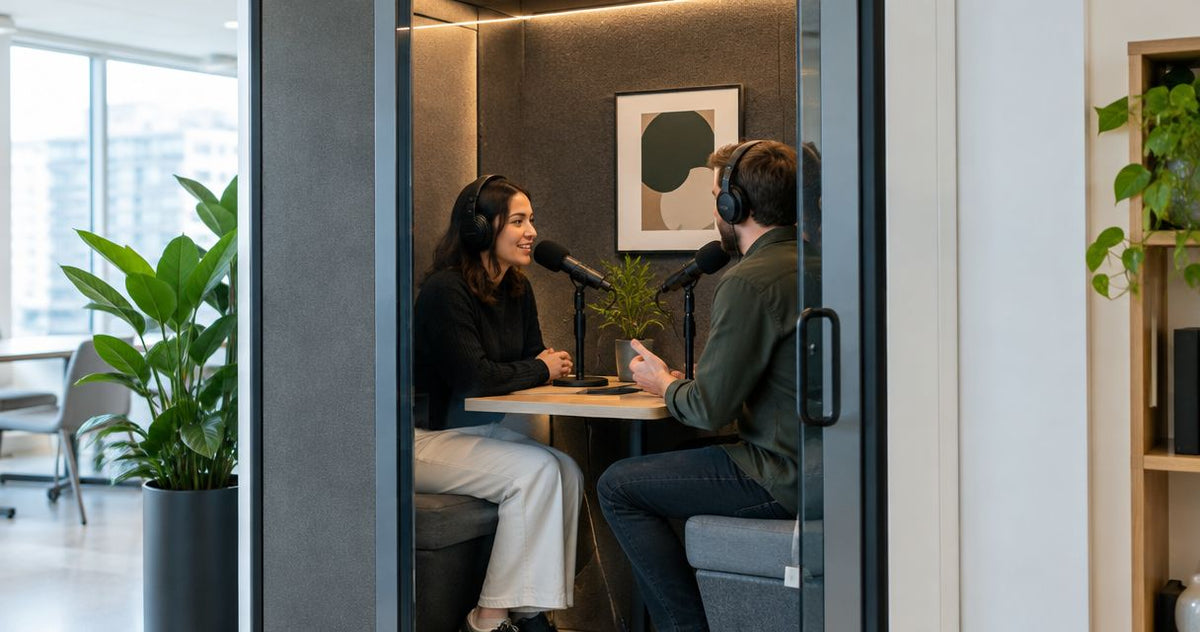
Yes, an office pod can be used as a podcast recording space when the microphone captures clear speech without distracting background noise or room reflections. An office pod for podcast recording is not automatically a recording studio: ventilation noise, sound entering from the office and the sound inside the enclosure all need checking with your recording equipment.
- An office pod for podcast recording can suit spoken-word work; judge the microphone recording, not perceived quietness.
- Quell Workspaces office pods warrant a recording test before you choose one for workplace podcast production.
- Sound isolation limits noise passing between spaces; acoustic treatment controls reflections inside the recording space.
- Test normal ventilation, microphone position and the actual conversation format before committing to a pod.
Why this matters
A pod that feels quiet during a telephone call does not necessarily produce the sound you want for a podcast. Your microphone captures background noise and room reflections that become more noticeable when listeners hear an isolated voice through headphones.
Start with the recording format, not the enclosure. A solo presenter, a remote interview and an in-person conversation place different demands on the space, furniture and equipment. The Office Phone Booth Folio is one commercial starting point to investigate for a booth-based setup; the decision still rests on a representative recording.
Can an office pod be used as a podcast recording space?
Yes, provided the pod works as part of the recording setup rather than being treated as the whole solution. The enclosure, microphone, speaker position and surrounding office all affect the result. You need to hear those elements together.
Use this sequence before choosing a pod for recording:
- Define the session. Establish whether you will record a solo voice, remote guests or people seated together.
- Recreate normal conditions. Keep the office operating and the pod's ventilation running as it would during a session.
- Record your actual equipment. Use the intended microphone, recorder or computer, headphones and recording software.
- Listen to speech and pauses. Check intelligibility, reflections, mechanical hum and interruptions from outside.
- Repeat after adjustments. Change microphone position or seating before deciding whether the space meets your needs.
Do not make the decision from a demonstration conversation alone. A live call and a recorded episode are different listening experiences, and a sample file gives your editor something concrete to assess.
Match the recording format to the space
| Recording format | Best for | Main advantage | Main limitation to check |
|---|---|---|---|
| Solo presenter | Narration, introductions and internal updates | A straightforward microphone setup with no other local speaker | Whether the enclosure adds an audible hollow or boxy character |
| Presenter with remote guests | Interviews where guests join from elsewhere | Only the local presenter needs space inside the pod | Connection reliability and the quality of each remote recording |
| In-person conversation | Interviews and discussions with people together | Participants can respond face to face | Microphone separation, furniture noise and room for recording equipment |
The simplest format is not necessarily the right editorial choice. If face-to-face discussion matters to your programme, assess a space that accommodates that discussion rather than squeezing the format into a smaller booth.
Solo speech: prioritise microphone position
A solo recording removes the challenge of separating several local voices. It does not remove room sound. Reflections from nearby surfaces can still colour the voice, particularly when the microphone sits far from the speaker.
Position a directional microphone so that the presenter can speak naturally and maintain a consistent distance. Moving closer increases the voice relative to the room, but excessive proximity can introduce plosives or an exaggerated bass response with some microphones. Follow the microphone manufacturer's guidance rather than applying a universal distance.
Listen for changes when the presenter turns towards notes or a screen. A position that sounds good during a fixed demonstration can become inconsistent during an actual episode. Keep the script and recording controls where they do not force repeated head movements.
Best for: solo narration and spoken updates where a consistent speaking position suits the format. The limitation is that an enclosed space still needs an audible check; being alone does not guarantee a dry recording.
Remote interviews: separate the local and remote problems
For a remote interview, the pod affects the local presenter's sound, not the guest's room or microphone. A clean local recording cannot repair a remote guest's echo, distorted input or interrupted connection.
Use headphones so the guest's voice does not play through loudspeakers and feed back into the local microphone. Check the recording application's input selection before the session: choosing the computer's built-in microphone instead of the intended microphone defeats the preparation.
Where your software supports separate recordings, keep participants on separate tracks. That gives the editor independent control over each voice, although it does not eliminate noise already captured alongside speech.
Best for: workplace interviews with contributors joining remotely. The advantage is that the local space only needs to accommodate the presenter and equipment; the limitation is that the overall episode still depends on every contributor's recording conditions.
In-person interviews: assess the equipment layout
For an in-person podcast, the advertised seating capacity is only the starting point. People also need space for microphones, headphones, notes and natural movement. A meeting arrangement and a recording arrangement are not interchangeable.
A microphone for each speaker gives you more control during editing, particularly when the voices are recorded separately. However, each microphone can also capture the other speaker. Positioning matters, and separate tracks do not make microphone bleed disappear.
The following are capacity-based starting points, not claims of podcast performance:
| Product | Stated capacity | Best for assessing | Limitation before choosing |
|---|---|---|---|
| Quell+ - 2 Person Pod | 2 people | An interview with a presenter and guest | Check both microphones, seating positions and equipment together |
| Folio Office Pod - 2-4 Person | 2–4 people | A conversation requiring a larger stated seating capacity | Seating capacity does not establish usable recording space or sound quality |
Quell Workspaces office pods are an option for workplace teams recording speech, not a substitute for a recording test. Choose against the intended session, not the largest capacity label. Extra seats alone do not establish a better recording environment.
Why podcast recording quality varies between pods
The relevant differences are the ones your microphone captures. Separate these factors when investigating a disappointing recording, because they require different responses:
- Noise entering the enclosure. Nearby conversations, office activity and intermittent sounds can interrupt a recording. Check during representative working conditions, not only when the surrounding office is empty.
- Reflections inside the space. Glass and other hard surfaces reflect sound. Internal absorption changes those reflections, but it is not the same as stopping sound entering from outside.
- Ventilation and equipment noise. Fans, computers and other devices can contribute a continuous background sound. Record with the equipment operating normally.
- Microphone placement. Distance, direction and microphone pickup pattern affect the balance between the voice and the room. A different position can change the result without changing the pod.
- Furniture and handling noise. Chair movement, table contact and microphone handling can enter the recording. Include ordinary gestures and movement in the test rather than asking everyone to remain unnaturally still.
Sound isolation and acoustic treatment solve different problems. If voices from outside remain audible, adding absorption inside does not establish that the enclosure will block them. If the presenter's voice sounds reflective, a quieter surrounding office will not remove those internal reflections.
How to test a pod before recording an episode
A useful test resembles the session you intend to produce. Bring the microphone and headphones you plan to use, open the intended recording application and arrange the presenter as they would sit during an episode.
Record the background first
Capture a passage with nobody speaking. Keep normal ventilation and recording equipment running, and listen for a steady hum, nearby speech or recurring interruptions.
This recording helps distinguish the background from sounds caused by the presenter. Do not assume that processing will remove everything: noise reduction can also affect the voice, especially when the unwanted sound overlaps speech.
Record natural speech and movement
Read a typical introduction, then speak without a script. Include the changes in volume and posture that happen during a real conversation, along with ordinary use of notes and recording controls.
For interviews, test both people speaking and taking turns. Listen for differences between the voices, microphone bleed and any table or chair noise. A carefully motionless demonstration is not representative of an animated discussion.
Listen before adding processing
Assess the unprocessed recording first. Listen through headphones, then through the playback system normally used by the person approving your episodes.
Separate the problems you hear. A reflective voice, a distant microphone and an audible fan are not the same fault. Adjust the relevant part of the setup and record again, keeping other settings consistent so the comparison remains useful.
Check the whole session workflow
An acceptable voice sample is necessary, but the recording workflow must also work. Confirm that the software records the intended inputs, files can be saved and retrieved, and a remote contributor can hear the presenter clearly.
Repeat the test after a meaningful change to the microphone, seating or surrounding office. Keep an example of the agreed sound so that future presenters and editors share the same reference rather than relying on memory.
When a pod is the wrong recording choice
An office pod is a poor fit when the programme requires a recording arrangement the available space cannot accommodate. That includes sessions where participants cannot maintain useful microphone positions or where equipment interferes with normal conversation.
It is also the wrong choice when representative recordings contain unacceptable noise that remains after practical adjustments. Reject the recording result, not just an individual symptom. A quieter microphone setting is not a solution if it also makes the presenter's voice too faint.
For music, sound effects or recordings with demanding isolation requirements, assess a purpose-designed recording space against the actual brief. Spoken-word suitability does not establish suitability for every source or production standard.
Before choosing a Quell Workspaces pod, make the recording format and a representative audio sample part of the discussion. That keeps the decision focused on the work you need the space to perform rather than assumptions about the word “acoustic”.
FAQ
Will an office pod completely block office noise from a podcast recording?
Do not assume an office pod completely blocks office noise. Record with your intended microphone during normal office activity and check whether outside sounds remain audible.
Do I need acoustic treatment inside a pod for podcasting?
Additional acoustic treatment is needed only if the recording reveals reflections that require attention. Internal absorption addresses room reflections; it does not establish that outside noise will be blocked.
Which microphone should I use in an office pod?
Choose a microphone that works with your recording equipment and speaking arrangement. A directional microphone can help prioritise the presenter's voice when positioned correctly, but it does not remove every unwanted sound.
Can I record a video podcast inside an office pod?
Yes, provided the space accommodates the camera, framing, lighting and audio equipment your format requires. Test the image and sound together, including reflections in glass and noise from operating equipment.
Should I turn off the pod's ventilation while recording?
Do not make switching off ventilation your recording strategy. Test under normal operating conditions, follow the manufacturer's operating guidance and address audible noise through the recording setup or choice of space.
Can an office pod replace a dedicated podcast studio?
An office pod can provide a workable space for spoken-word recording, but it is not automatically equivalent to a dedicated studio. The decision depends on a representative recording and whether the space supports your production workflow.
One last thing
Keep the pauses when you assess a test recording. Speech can draw attention away from background noise; the gaps between sentences often make that noise easier to hear.
Listen to those gaps before approving the space. If the recording only sounds acceptable while someone is talking, identify what happens during pauses before committing an episode to the setup.


