
21 October 2026 · Editorial Team
Configuring modular office furniture for flexible meetings

Instead of rearranging tables and chairs before every meeting, configure modular office furniture around repeatable layouts for a flexible meeting space. Give each layout a purpose, a reset routine and a named owner so the room changes with the meeting rather than becoming an improvised furniture store.
- Configure modular office furniture for a flexible meeting space around named activities, not an unrestricted collection of movable pieces.
- Quell Workspaces meeting-pod furniture is relevant when your meeting brief includes an enclosed space.
- Define a default layout, a workshop layout and a reset routine before choosing additional furniture.
- Test each arrangement with the actual meeting materials; movable furniture alone does not solve speech privacy.
Why this matters
A flexible meeting space needs more than furniture that can change position. You need to know which arrangement supports each activity, where unused pieces belong and who restores the space afterwards. Without those decisions, every organiser inherits the previous meeting's layout.
Start with the activity rather than the furniture catalogue. A document review needs shared working surfaces; a discussion needs clear views between participants. A hybrid meeting also needs a camera view that includes the people in the room.
Quell Workspaces meeting-pod furniture is best considered for teams whose flexible meeting brief includes an enclosed space. Review the furniture options against that brief, rather than assuming that furniture intended for one setting will suit every arrangement.
Furniture planning and enclosure planning are separate decisions. Changing the seating pattern changes how people interact, but it does not establish speech privacy.
Before you start
- Gather the working brief. Record the activities the space must support, expected attendance, existing furniture and the materials people bring. Use the current room plan and supplied product information rather than estimated furniture dimensions.
- Agree who controls the space. Identify the person responsible for layout changes, the booking description and the reset routine. Bring the people responsible for meeting technology into the planning discussion before selecting arrangements.
- Check the hidden constraint: unused furniture. A layout is not complete until every displaced table and chair has an agreed destination. Do not assume that modular pieces nest, fold, connect or move easily unless the supplied product information confirms it.
This is a planning and meeting-use workflow, not a furniture assembly guide. Follow the relevant supplier's instructions for any product adjustment; the steps below define what the room should do, not how to assemble or install its contents.
Meeting brief
Turn activities into configuration requirements
- List the meetings the room actually hosts. Use plain activity names such as project briefing, document review and workshop. Avoid a single entry labelled collaboration: it conceals different needs.
- Write the output beside each activity. A project briefing ends with shared understanding; a document review ends with agreed changes. The intended output tells you whether participants need to face a presenter, shared papers or each other.
- Record the working materials. Include laptops, notebooks, printed drawings and presentation equipment where relevant. Do not select a surface arrangement using empty tables as the test.
- Separate conversation needs from furniture needs. Identify meetings that require an enclosed setting. Do not treat a rearrangement of open furniture as a substitute for an enclosure.
- Choose the default activity. Give the most frequent suitable meeting a standard starting layout. Make less frequent activities deliberate alternatives rather than allowing every booking to begin from scratch.
Use a simple planning record with the fields Activity, Attendance, Materials, Layout and Reset owner. These are suggested document headings, not settings in a particular booking platform.
Expected result: each meeting activity has a clear working requirement, and the default layout has a reason to exist.
Compare the arrangements before choosing furniture
The following arrangements are planning options, not claims that any particular furniture product supports them. Check the actual pieces before adopting a layout.
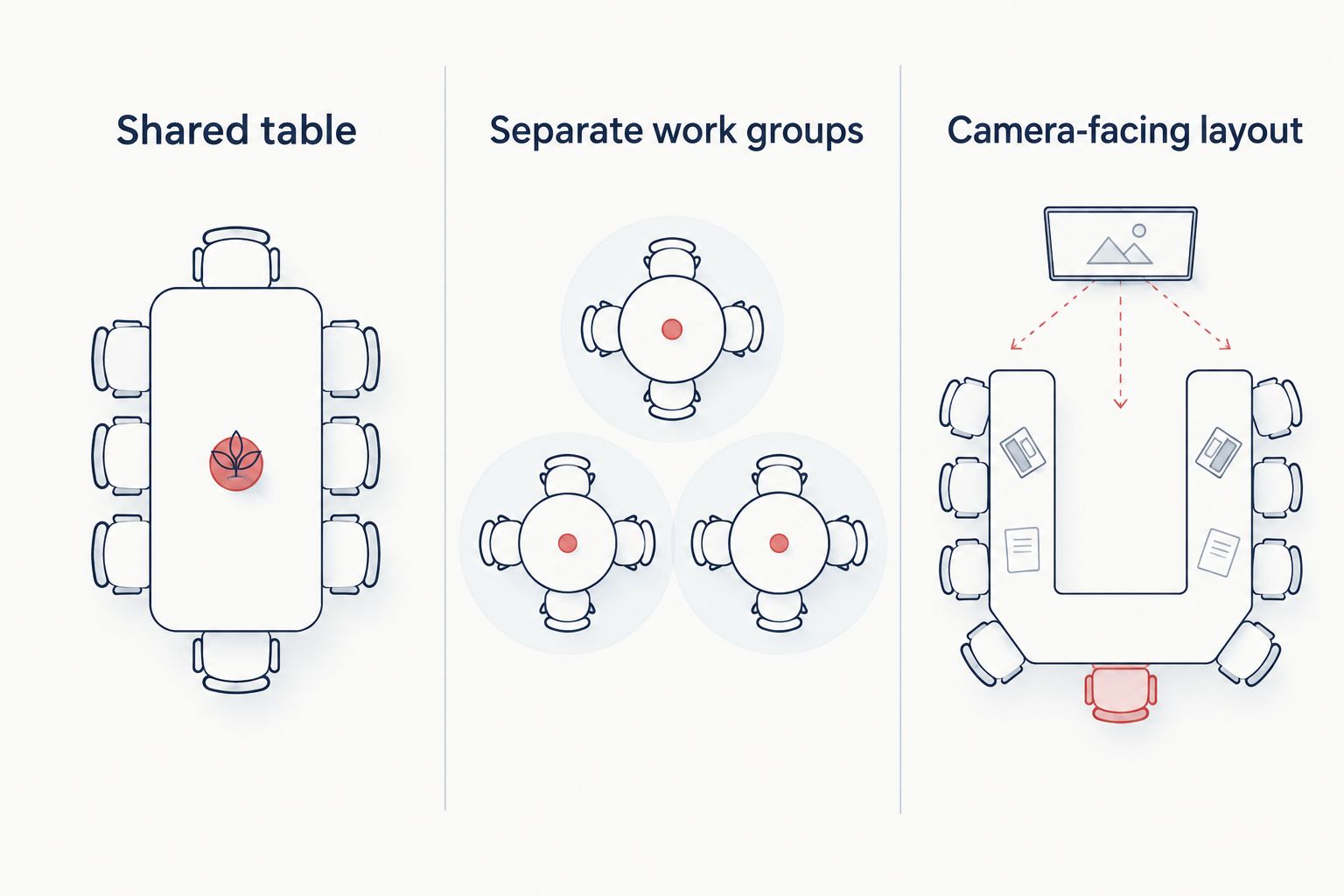
| Arrangement | Best for | Main advantage | Main limitation |
|---|---|---|---|
| Shared table | Document reviews and joint decisions | Keeps working materials together | Does not create separate group-work areas |
| Separate work groups | Workshops with parallel tasks | Gives each group its own working surface | Requires a plan for bringing everyone back together |
| Discussion seating | Conversations without extensive desk work | Makes face-to-face exchange the focus | Provides less shared surface space for papers and laptops |
| Camera-facing layout | Meetings with remote participants | Makes the camera position part of the seating plan | Requires a fresh camera check after furniture changes |
Choose the arrangement that supports the work, not the arrangement that looks most flexible. Discussion seating is a poor default when almost every meeting involves document editing. Equally, a shared table is not automatically the right answer for a workshop with parallel tasks.
Layout plan
Define repeatable room states
- Draw the default layout. Use the current room plan and confirmed furniture information. Show the working surfaces, seating and presentation position without inventing product dimensions.
- Draw the workshop alternative. Include only changes that serve a named activity. If separating tables produces no useful working difference, keep the simpler arrangement.
- Account for every displaced piece. Write down where unused furniture belongs. A plan that depends on an unspecified storage area is unfinished.
- Mark the technology position. Record where participants look, where shared content appears and what the camera sees. Ask the person responsible for the equipment to confirm the intended arrangement.
- Name each room state. Use labels such as Shared table, Separate work groups and Camera-facing layout. Match those labels in your planning record and booking description.
Keep the plan focused on usable states rather than every possible permutation. More arrangements create more instructions to maintain; an arrangement earns its place only when it supports a distinct activity.
Expected result: an organiser can select a named layout without designing a new room arrangement for each booking.
Separate the furniture decision from the room decision
If the brief includes an enclosed meeting space, assess the enclosure and its furniture together. Do not assume that furniture used in an open room can transfer unchanged into a pod, or that a pod's furniture supports the same rearrangements.
Quell Workspaces supplies meeting-pod furniture, but the configuration still needs to match the selected enclosure and activity. Confirm the proposed combination from the relevant product information before treating it as part of your layout plan.
The benefit of an activity-led brief is clarity: you can explain what participants need to do. Its limitation is equally important: a brief does not prove product compatibility, furniture movement or acoustic performance.
Trial and reset routine
Rehearse the meeting, not just the furniture arrangement
- Bring representative materials. Put the documents, laptops and other working items into the proposed arrangement. Ask participants to carry out the intended task rather than simply sit down.
- Run a short briefing. Use a proposed 15-minute session to check whether everyone can follow the discussion and see shared material. This is a planning exercise, not a product-performance benchmark.
- Run a workshop segment. Use a proposed 30-minute session to test the alternative arrangement with a real group task. Record where materials accumulate and whether participants keep changing position.
- Check the remote participant's view. For hybrid meetings, ask someone joining remotely to describe what they can see and hear. Do not approve the arrangement solely from inside the room.
- Rehearse the reset. Start with a proposed 5-minute target, then record the actual reset duration. Adjust the schedule to the observed result rather than promising that every changeover fits the target.
Write observations against the activity: papers had no shared surface, a participant was outside the camera view, or unused chairs had no agreed destination. These descriptions lead to specific changes; a general comment that the room felt awkward does not.
Expected result: the layout works with real meeting materials, and the reset duration comes from a rehearsal rather than an assumption.
Give the reset a clear owner
The reset routine should state which layout to restore, what happens to meeting materials and who confirms the room is ready. Choose whether the meeting organiser or a designated team owns that task; do not leave both assuming the other will act.
Record the default layout in the booking description and keep the same name on the room plan. If the arrangement changes, update both records together. Conflicting instructions create unnecessary rearrangement even when the furniture itself is suitable.
Switch from document review to a hybrid workshop
A useful second workflow is a meeting that changes activity halfway through. The furniture plan must support the transition, not just the opening discussion.
- Begin with the shared-table arrangement. Use it while participants review the same material and agree the task.
- Move to separate work groups only when the task requires them. Give each group the materials it needs before the change.
- Recheck the camera-facing layout. Confirm how remote participants will take part after the room changes, rather than leaving them watching a layout designed for the opening review.
- Return to the shared discussion. Bring the outputs together, then restore the named default arrangement after the meeting.
Best for: workshops that genuinely alternate between shared review and parallel tasks. The advantage is a layout matched to each activity; the drawback is an additional transition to manage.
If the transition repeatedly interrupts the session, simplify the plan. Keep one arrangement and change the task format instead. Flexibility is useful only when the change helps the meeting.
Troubleshooting
The room never returns to its default layout
Make the reset owner explicit and use the same default-layout name everywhere. If the reset needs longer than the booking allows, change the schedule or reduce the rearrangement; do not rely on the next organiser to fix it.
Unused furniture accumulates around the meeting area
Return to the layout plan and give every displaced piece an agreed destination. If no suitable destination exists, remove that alternative from the workflow until the storage question is resolved.
Remote participants lose sight of people after a change
Repeat the camera check in the alternative layout. Keep a separate camera-facing arrangement if necessary, and make it the default for hybrid bookings rather than assuming one camera position suits every room state.
The furniture changes, but conversations still disturb nearby work
Treat speech privacy as a separate room requirement. Review whether the activity needs an enclosed setting; do not describe a new seating pattern as an acoustic solution or assign it an unsupported sound-reduction figure.
Every meeting organiser invents a different arrangement
Reduce the layout menu to arrangements with distinct purposes. Ask organisers to select an existing room state first, then record a specific unmet need before introducing another one.
Customise your workflow
Expand the system by adding a new activity, not by adding furniture without a use case. Record the activity, test an arrangement and update the reset routine only after the trial shows a useful difference.
For Quell Workspaces meeting-pod furniture, keep the furniture selection tied to the enclosure brief. Where hybrid meetings are part of that brief, the meeting-pod video-call workflow is a related planning topic.
Revisit the room plan when meeting patterns change. A room that shifts from document reviews to remote presentations needs a different test, even if the furniture remains unchanged.
FAQ
How do I configure modular office furniture for a flexible meeting space?
Start with named meeting activities, then define a default layout and useful alternatives. Test each arrangement with real working materials and give the reset routine a named owner.
Is movable furniture enough to make a meeting room flexible?
No. A flexible meeting room also needs repeatable layouts, a destination for unused furniture and a reset routine. Confirm any movement or adjustment features from the relevant product information.
Which furniture arrangement works best for document reviews?
A shared-table arrangement is the starting point for document reviews because it keeps working materials together. Test it with the papers and equipment participants actually use before making it the default.
Can a workshop layout also work for hybrid meetings?
A workshop layout needs a separate camera and participation check before you use it for hybrid meetings. Ask a remote participant to check the alternative arrangement, not just the opening layout.
Does changing the furniture layout improve speech privacy?
A furniture-layout change does not establish speech privacy. Treat the need for an enclosed setting separately from the choice of tables and seating, and avoid unsupported acoustic claims.
What should I check before choosing meeting-pod furniture?
Check the intended activity, the selected enclosure and the proposed furniture combination. Use the supplied product information to confirm suitability rather than assuming that open-room furniture arrangements transfer unchanged into a pod.
One last thing
Approve the reset before approving another layout. A flexible meeting space that supports an impressive workshop but cannot return to its everyday arrangement has an unfinished workflow. Photograph or draw the agreed default, name its owner and rehearse the return journey.


