
21 October 2026 · Editorial Team
How to add an office pod to your office floor plan

Instead of repeatedly moving a pod-shaped box around an outdated drawing, build your office pod floor plan from a checked room layout, the selected product’s dimensions and a clear use case. This workflow takes you from an initial space allocation to a documented layout for discussion with your workplace team and supplier.
- Build your office pod floor plan around the activity first, then the selected product’s actual dimensions.
- Quell Workspaces acoustic office pods suit teams planning dedicated spaces for calls and private meetings.
- Show the pod footprint, furniture arrangement and surrounding office context separately.
- Keep unresolved dimensions and service questions visible rather than treating assumptions as confirmed facts.
Why this matters
A rectangle shows occupied floor space, not whether the proposed location supports the work you need to do. Your drawing also needs to explain who uses the pod, what happens inside it and how it relates to nearby desks and shared spaces.
Quell Workspaces acoustic office pods are best for teams adding dedicated call and meeting spaces to a shared office. Choose the use case before selecting the product; a phone-call brief and a small-meeting brief ask different things of the same floor plan.
| Product | Best for | Planning advantage | Limitation to resolve |
|---|---|---|---|
| Office Phone Booth Folio | A dedicated phone-call space | Gives the drawing a specific call-focused purpose | Does not answer a separate brief for shared meetings |
| Quell+ - 2 Person Pod | Two-person conversations | Establishes a defined meeting use case | Does not answer a brief for larger groups |
| Folio Office Pod - 2-4 Person | Meetings involving two to four people | Provides a group-meeting option to investigate | The occupancy description does not establish its external footprint |
Treat these as different starting points, not interchangeable boxes. Product names and occupancy descriptions do not replace dimensioned information.
Before you start
- Gather the current floor drawing, permission to edit it and a record of furniture that will remain. Use your existing drawing application; this workflow does not depend on a particular software package.
- Obtain dimensioned information for the exact pod and proposed internal furniture. Record the source beside the drawing so another person can trace each product-specific measurement.
- Check the drawing’s units before importing anything. A product image is not a scale drawing, and an imported outline can look convincing while representing the wrong size.
Keep this exercise at layout-planning level. The drawing records your preferred arrangement and outstanding questions; it does not provide technical installation instructions or establish that a position is ready for installation.
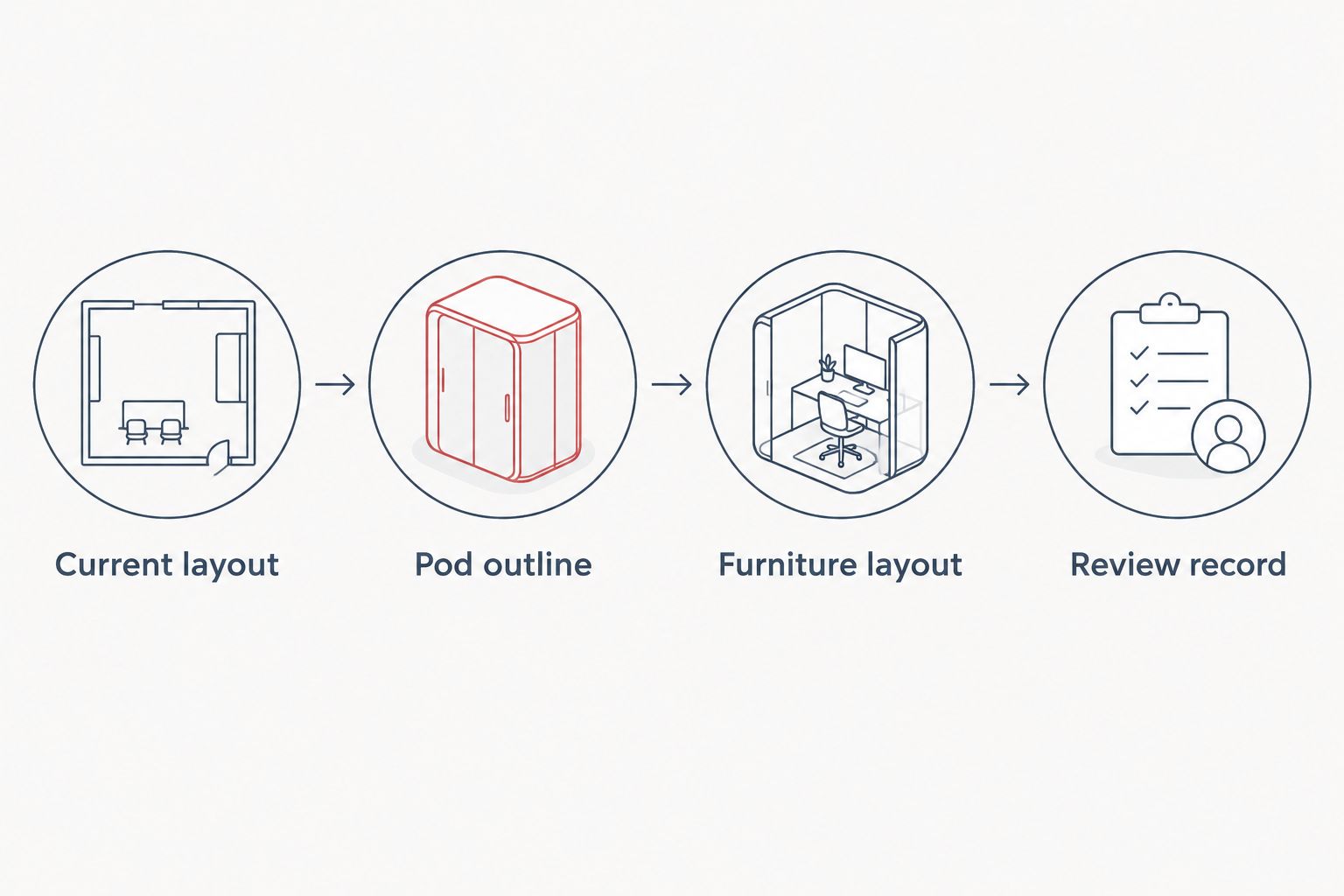
Current layout
Establish the drawing you can trust
- Open the most recent office plan and save a separate working copy. Give it a descriptive name that distinguishes the proposed pod layout from the existing arrangement.
- Check the drawing units against a known dimension on the original plan. Use millimetres consistently: 1 m equals 1,000 mm.
- Record the walls, columns, fixed rooms, desks and shared facilities relevant to the proposed location. Separate confirmed information from items that still need checking.
- Keep existing furniture distinct from proposed furniture. Use separate layers, groups or drawing styles supported by your application rather than merging everything into one outline.
- Add a short brief beside the plan: the activity, intended users, expected occupancy and furniture needed for that activity.
Expected result: you have a current office layout and a written reason for adding the pod. Someone opening the file should understand both without needing your verbal explanation.
Check scale without guessing
If you are working with a printed plan, use its stated scale rather than measuring a screenshot. At 1:50, a real-world distance of 1 m appears as 20 mm on the drawing; at 1:100, it appears as 10 mm. These are scale conversions, not recommended pod dimensions.
A printout resized to fit a page no longer necessarily matches its stated scale. Keep dimension annotations visible and check the print settings before using paper measurements to compare layouts.
Pod outline
Draw the selected product, not a generic symbol
- Identify the exact product under consideration. If you are comparing alternatives, give each one its own outline and source reference.
- Draw the external footprint using the supplied dimensions. Do not substitute an internal room measurement or estimate the outline from a photograph.
- Show the documented entrance position and orientation. If the information is unresolved, mark it as a question rather than selecting an orientation because it looks convenient.
- Position the outline within the office drawing. Keep nearby desks, meeting rooms and shared facilities visible so reviewers can understand the location in context.
- Record any product-specific spatial information supplied for planning as a separate annotation. Do not invent allowances or present a generic gap as a manufacturer’s requirement.
Expected result: the proposed pod occupies a traceable, dimensioned position on the plan. Its footprint is clearly distinguishable from surrounding office furniture and any unresolved planning annotations.
Compare locations against the same brief
Use the same product outline when comparing candidate locations. Changing both the product and its position at once makes it harder to explain why one layout is preferable.
For each location, ask whether the intended users can find it easily, whether its entrance faces a distracting part of the office and whether the placement supports the stated activity. These are workplace-planning questions, not proof of acoustic performance or technical suitability.
Keep a rejected location and its reason in the working file. That short record prevents the same suggestion returning at every review without the context behind the decision.
Furniture layout
Show how the space will be used
- Add the proposed internal furniture using dimensions supplied for that configuration. Keep the furniture separate from the pod outline so you can revise either without redrawing both.
- Represent the actual activity: a caller using a laptop, a conversation across a table or a group viewing shared material. Use simple symbols rather than decorative rendering.
- Show the orientation of proposed seating and work surfaces. A footprint alone does not explain where people face or how the internal arrangement supports the brief.
- Mark equipment and service questions for the relevant team. Record what needs confirmation without drawing an assumed connection or treating a nearby outlet as a completed solution.
- Compare the internal arrangement with the original brief. Remove furniture added only to make the drawing look complete.
Expected result: the office pod floor plan explains the intended activity inside the enclosure, not just the amount of office floor occupied by its exterior.
Separate visual privacy from acoustic expectations
Check what a person outside the proposed pod would face and what a person inside would look towards. A location beside a busy shared area raises different visual questions from a location facing a quieter work zone.
Do not use the drawing to promise that conversations will be inaudible outside. A floor plan records spatial relationships; acoustic performance needs its own product information and project-specific discussion.
For Quell Workspaces products, keep any proposed furniture or accessory tied to the selected configuration. An accessory name elsewhere in a catalogue does not establish that it belongs in your chosen layout.
Review record
Turn the drawing into a decision document
- Create a review view showing the proposed pod, surrounding furniture and the written use case. Keep unnecessary decorative detail out of this view.
- Separate confirmed facts, preferences and open questions. A preferred entrance direction is not the same thing as a documented product configuration.
- Assign each unresolved question to the person responsible for answering it. Include the workplace team, supplier and relevant technical specialists where their input is needed.
- Save the reviewed version and record the decision beside it. State whether the location is selected, needs revision or remains an alternative.
- Update the main office plan only after the selected product and layout information agree. Retain the review copy so the decision remains traceable.
Expected result: reviewers can identify the proposed arrangement, the information supporting it and the questions still preventing a final layout decision.
The sequence matters: establish the office layout, insert the documented pod outline, add the intended furniture and then record the review. A polished rendering cannot compensate for an unresolved footprint.
Update the plan when the office layout changes
The same workflow also works when you are revising an existing pod location rather than adding a new pod. Start with the changed office arrangement and preserve the documented product outline.
Duplicate the reviewed drawing, update the desks or shared facilities that have changed, and reassess the original use case. A location selected for one team arrangement deserves another review when the surrounding activity changes.
| Workflow | Best for | Advantage | Limitation |
|---|---|---|---|
| New pod proposal | Adding a dedicated call or meeting space | Lets you compare products and positions against a new brief | Requires product information before the footprint is meaningful |
| Existing layout revision | Reconsidering a documented pod within a changed office | Preserves the product information already recorded | The previous location decision does not answer the revised brief |
Keep the old decision record, but do not copy its conclusion automatically. Reuse confirmed information; reconsider assumptions about who uses the space and what happens around it.
Troubleshooting
The imported outline looks too large or too small
Check source units and import scaling before changing the product outline manually. Compare a known dimension in the source drawing with the same dimension in your working file, then correct the import settings.
The pod fits the drawing but not the intended activity
Return to the written brief and internal furniture arrangement. A matching external footprint does not establish that the proposed configuration supports laptop work, a conversation or a group meeting.
Reviewers keep moving the pod to different locations
Put the use case and selection criteria beside each candidate position. Ask reviewers to identify which requirement their proposed move improves, then record the trade-off rather than moving the symbol without explanation.
The drawing contains conflicting measurements
Keep the discrepancy visible and ask for clarification against the exact product and configuration. Do not average conflicting dimensions or choose whichever figure makes the preferred location work.
The presentation looks finished while questions remain
Separate the presentation view from the decision record. Keep unresolved items visible in the review copy, and avoid labels that imply the arrangement has been confirmed when important information is still outstanding.
Customise your workflow
Expand the drawing into a short procurement and workplace brief. Include the named activity, selected product, referenced dimensions, proposed furniture, preferred location and questions requiring answers.
Use the same brief when discussing Quell Workspaces options so the conversation stays attached to the proposed layout. If the product changes, replace its outline and review the arrangement again rather than carrying the previous footprint forward.
For the next document in that process, use the guide to writing an office pod brief for your fit-out contractor. Keep the brief and floor plan together so a change to one prompts a check of the other.
FAQ
How do I add an office pod to an existing floor plan?
Start with a checked office drawing, add the selected pod’s documented external footprint, then show the intended furniture arrangement. Record unresolved product and service questions separately before treating the proposal as a final layout.
What dimensions do I need for an office pod floor plan?
Use the external dimensions of the exact pod and the dimensions of its proposed internal furniture. Record any additional spatial information supplied for that product separately; do not estimate it from photographs.
Can I use a product photograph to draw the pod to scale?
No, a product photograph is not a reliable scale drawing. Use dimensioned product information and check that your drawing application uses the correct units.
Where should an office phone booth go on the plan?
Choose a candidate location against the intended call activity and its relationship with nearby work areas. Show the documented entrance orientation and surrounding furniture, then review the proposal with the relevant workplace and supplier teams.
Should I draw the furniture inside the pod?
Yes, show the proposed furniture so reviewers can understand the intended activity. Use information for the selected configuration rather than adding generic furniture and assuming it fits.
Does a floor plan confirm that a pod is ready for installation?
No, a floor plan records the proposed spatial arrangement. Keep technical installation questions separate and obtain the relevant project-specific information before proceeding.
One last thing
Keep the reason for the location on the drawing. Dimensions explain what occupies the space; the brief explains why it belongs there. That distinction makes the plan more useful when a different person reviews it or the surrounding office changes.


