
23 October 2026 · Editorial Team
Office pods for call centres and customer service teams

Call centre office pods are enclosed workspaces for customer conversations and team discussions, intended to separate selected tasks from the shared call floor. Choose them around the work agents need to do, not simply the number of desks.
- Office pods for call centres suit selected conversations, not an automatic replacement for every agent’s desk.
- Quell Workspaces is best for teams seeking dedicated acoustic call and meeting spaces.
- Separate solo customer calls from coaching sessions before choosing a booth.
- Set access rules and measure use before expanding your shared pod provision.
Why office pods matter for call centres
Customer service teams need both immediate collaboration and somewhere to hold a separate conversation. Treat pods as task-specific spaces, not a substitute for managing the call floor.
How to plan pods for your customer service team
1. Identify the conversations that need separation
Start with a simple task list. Ask agents and supervisors which conversations are difficult to handle at their usual desks, then record the reason rather than assuming every call needs a booth.
- Escalated customer calls.
- Scheduled callbacks.
- Individual coaching.
- Quality-review discussions.
2. Match the space to the task
Review an office phone booth for individual conversations before considering a larger shared meeting space. A solo customer call and a supervisor-led coaching session are different activities; your shortlist should reflect that difference.
The manual starting point is an existing room or a designated quieter desk. Use either to understand whether the task genuinely benefits from separation. A dedicated pod becomes relevant when you want a distinct workspace for that activity rather than repeatedly borrowing another team’s room.
Quell Workspaces acoustic pods are best for customer service teams seeking dedicated spaces for calls and meetings. The limitation is organisational: an enclosure does not decide who gets access, how long they stay or which task takes priority. You need those rules alongside the product choice.
Avoid choosing the largest space by default. If your main requirement is individual callbacks, a meeting-focused shortlist does not answer the same brief. Conversely, a phone booth is not the right starting point for a discussion that requires an agent and supervisor to work together.
- Write a separate brief for solo calls and shared discussions.
- Identify whether each task uses a headset, laptop or other existing equipment.
- Distinguish spoken conversations from quiet administrative work.
- Check the relevant product information against the intended activity.
- Keep occasional team meetings separate from daily call requirements.
3. Assess the actual working experience
Before committing to a particular format, walk through the work an agent would do inside it. Start with your existing call equipment and a representative task, rather than a conversation conducted without the tools agents normally use.
Include both sides of the call in the assessment. Ask the listener to describe background sound and speech clarity, and ask the agent whether they can complete the task without changing their normal working method. Record observations in plain language so your team can compare experiences consistently.
Do not treat acoustic separation, visual screening and information handling as interchangeable. A space that feels less distracting still requires the same care with customer records and spoken information. Avoid promising that a conversation cannot be heard outside an enclosure without evidence supporting that exact claim.
This assessment is about suitability for your workflow, not a substitute for product documentation. Use the supplier’s information for product facts and your own task walkthrough for operational decisions.
- Use the headset and device already assigned to the task.
- Recreate a typical conversation without real customer information.
- Ask the listener about intelligibility and background speech.
- Check whether the agent can refer to the necessary records.
- Record interruptions, equipment difficulties and unfinished tasks.
4. Set shared-access rules before adding capacity
Start with your existing calendar or booking process. You do not need a separate system to write down who can use a space, which activities take priority and how agents should release a booking they no longer need.
Call centre demand includes both planned and unplanned work. A scheduled coaching session can be booked in advance; an escalated call cannot always wait for the next convenient slot. Decide how those activities share access instead of leaving agents to negotiate during a live customer conversation.
Reserve space for a named task, not for an entire shift by habit. Long-standing reservations conceal whether the space is being used and can prevent another agent from completing a suitable task. Equally, constant interruptions to a booked coaching session defeat its purpose.
Keep the rules visible in your normal team communications. Ask supervisors to apply the same process themselves, so agents do not see a shared booth become an unofficial management office. Review booking conflicts as a planning issue rather than blaming individual users.
- Define which activities can be booked in advance.
- Explain how urgent customer conversations get access.
- Require unused bookings to be released.
- State how users report an equipment problem.
- Assign responsibility for resolving competing requests.
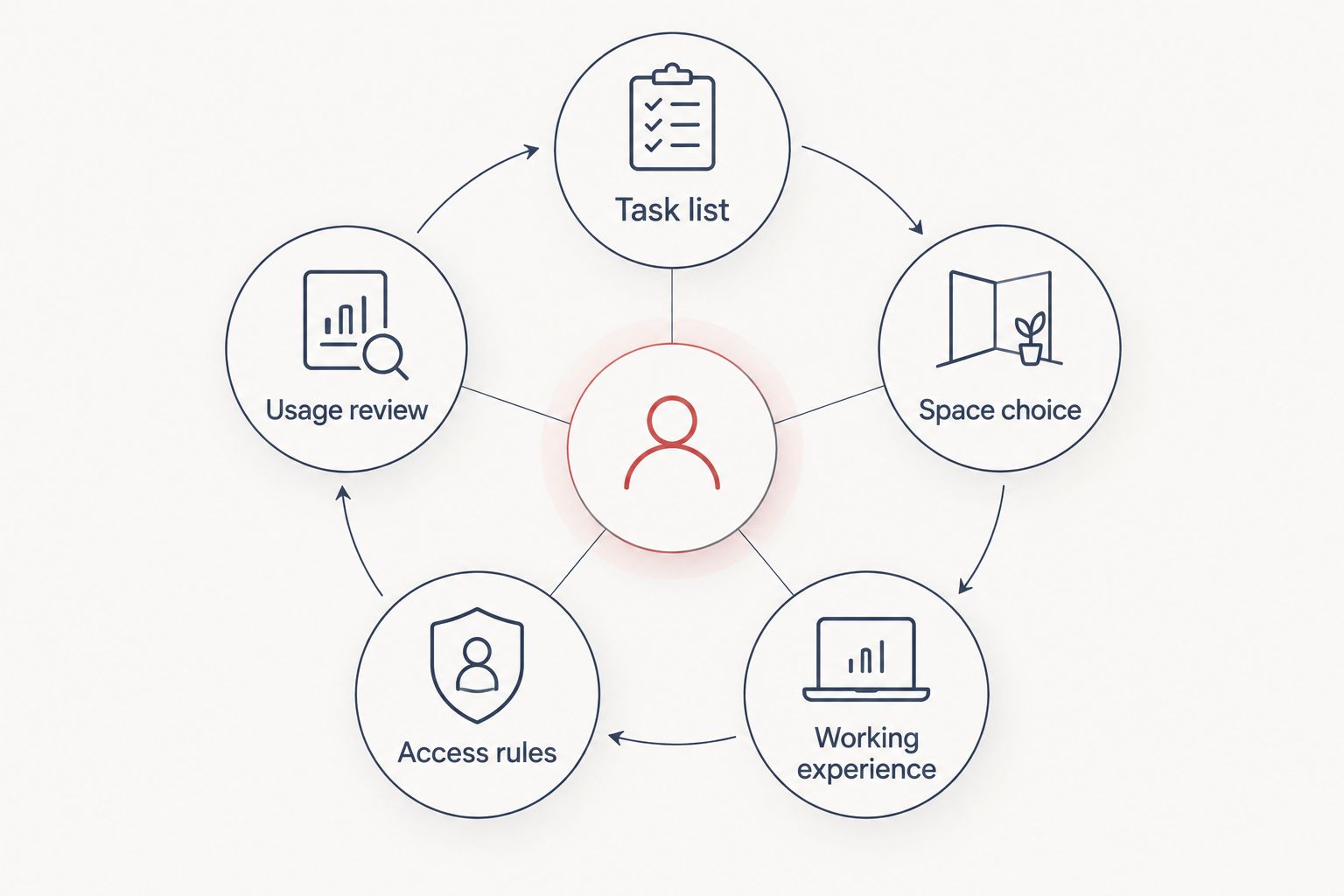
5. Keep agents connected to the team
Use your existing team channels to agree how agents signal that they are working away from their usual desks. Separation should support a particular conversation without making it unclear whether an agent is available for help, coaching or another assigned task.
Map the hand-off as carefully as the call itself. An agent handling an escalation needs a clear way to request supervisor support. A supervisor conducting a quality review needs to know who is covering immediate team questions during that discussion.
Decide where work begins and ends. Moving to a pod for every small follow-up can add an unnecessary change of setting; staying at a shared desk for a lengthy individual review can undermine the reason for providing a separate space. Let the task determine the move.
Quell Workspaces supplies acoustic office pods, phone booths and private meeting rooms. Those formats provide different starting points for a workspace brief, but your team’s communication process remains your responsibility. Do not expect a new enclosure to resolve an unclear escalation route.
- Agree a consistent status message for pod use.
- Keep the existing supervisor-help channel available.
- Define the hand-off for an unresolved customer issue.
- Tell colleagues when a booked discussion has finished.
- Avoid using a booth as permanent storage or a personal territory.
6. Separate call handling from coaching
Start by reviewing how your team currently conducts feedback. A private discussion about an agent’s work is not the same as an agent making a customer call, even if both activities need separation from nearby conversations.
For coaching, focus the brief on the actual discussion: reviewing a call, looking at records together or agreeing a next action. Do not choose a meeting space simply because it appears more versatile. Choose it because the activity needs a shared setting.
The supplied Folio Office Pod - 2-4 Person gives you a named shared-space option to consider alongside a phone booth. Its stated capacity is 2–4 people; that does not establish how your particular equipment or coaching process will work inside it. Check the product information and keep the brief tied to the task.
Protect individual call access when scheduling coaching. If every available space is routinely booked for internal discussions, agents cannot use those spaces for the customer conversations that justified them. Where tasks compete, change the schedule before assuming that another purchase is the answer.
- List the coaching activities that need a shared setting.
- Distinguish individual feedback from group training.
- Identify the records or screens participants need to review.
- Avoid blocking all call-focused spaces with internal meetings.
- Give each coaching discussion a defined purpose and finish.
7. Review use before expanding
Begin with a simple log or your existing booking records. Record the task, whether the space was actually used and whether another suitable request had to wait. A full calendar alone does not show useful use.
Compare booking patterns with what happens on the call floor. Repeated unused reservations point to access rules; repeated requests for a different type of conversation point to a mismatch between the space and the brief. These are different problems and require different responses.
Ask agents for specific feedback. A report that someone could not review records during a callback is more actionable than a general comment that the booth was disappointing. Likewise, a supervisor who cannot obtain space for planned coaching needs a scheduling review before a product recommendation.
Expand provision only after you can name the unmet task. That keeps the next decision focused on customer service work rather than on adding another enclosure because the first one attracts attention. Maintain the same review process after any change.
- Record the purpose of each session.
- Separate actual use from booked time.
- Note requests that could not be accommodated.
- Track recurring equipment or workflow difficulties.
- Compare demand for solo calls with demand for shared discussions.
- Adjust access rules before changing the product mix.
Compare the options by use case
The best option depends on the task you want to separate. Use a headset-equipped desk for routine desk-based work; consider a dedicated booth for selected individual calls and a shared space for coaching. None of these options replaces a clear customer service process.
The table compares workspace approaches, not verified acoustic performance. Product names identify the supplied options; they do not establish call-quality results or suitability for a particular equipment setup.
| Option | Best for | Practical advantage | Key limitation |
|---|---|---|---|
| Existing desk and headset | Routine calls within your normal desk workflow | Keeps agents close to their usual equipment and colleagues | Does not create a separate enclosed workspace |
| Existing meeting room | Scheduled coaching and internal discussions | Lets you assess the task using space you already have | Access competes with other room users |
| Office Phone Booth Folio | Teams considering a dedicated phone-booth format for individual calls | Provides a phone-booth option for your call-space shortlist | Task fit requires checking the product information and working process |
| Folio Office Pod - 2-4 Person | Teams considering a shared space for coaching or discussion | Has a stated 2–4-person capacity | Shared bookings can compete with other team discussions |
An existing room is a useful starting point when you are still defining the requirement. Its limitation is that it belongs to the wider workplace schedule. A dedicated booth makes the space’s intended purpose clearer, but only if your booking rules preserve that purpose.
Quell Workspaces offers both phone-booth and meeting-space formats. Compare the relevant product pages after defining the task; do not infer equipment compatibility, acoustic results or other specifications from a product name.


Common mistakes customer service teams make
Treating every call as a pod task
A booth brief that covers every customer interaction is too broad to guide a decision. Separate routine desk-based calls from the conversations that need a different setting, and document why each exception belongs there.
Mixing coaching with urgent-call access
Internal meetings and live customer escalations have different scheduling needs. If they share a space, define priority and hand-off rules before the first conflict occurs. Otherwise, the booking calendar becomes another obstacle during an already difficult conversation.
Assuming an enclosure resolves call quality
Call quality also involves the headset, connection and agent’s working method. Assess the complete task rather than attributing every problem to the surrounding office. Keep product performance claims separate from your own observations.
Buying around headcount alone
Agent numbers do not tell you which spaces the team needs. The useful questions are which tasks need separation, when requests overlap and whether those requests involve individual or shared work. Build the brief around those answers.
Counting reservations as successful use
A reserved booth can be empty, occupied for an unrelated task or unavailable to the intended user. Review completed activity and unmet requests alongside the calendar. Change the rule causing the problem before adding more space.
FAQ
What are office pods for call centres used for?
Office pods for call centres provide separate spaces for selected customer calls, callbacks, coaching and internal discussions. Define the activity first, then choose between an individual phone-booth format and a shared meeting-space format.
Does every customer service agent need a pod?
Do not assign a pod to every agent by default. Start with the tasks that need separation and review overlapping requests before deciding how much shared provision your team needs.
Is a phone booth better than a meeting pod for customer calls?
A phone-booth format is the more relevant starting point for an individual customer call; a shared meeting format suits a discussion involving colleagues. Check the relevant product information against the equipment and activity involved.
Can customer service teams use pods for coaching?
A shared pod is an option for coaching that requires an agent and supervisor to discuss work together. Keep scheduled coaching from occupying all the spaces intended for individual customer calls.
Does an acoustic pod make a conversation completely inaudible outside?
Do not assume that an acoustic pod makes speech completely inaudible outside. Use the supplied product information for performance claims, and continue your normal information-handling procedures.
How should a call centre manage shared pod bookings?
Set separate rules for planned sessions and urgent customer conversations. Require unused bookings to be released and review actual activity alongside requests that could not be accommodated.
One last thing
A busy booth is not automatically evidence that you need another booth. Check what people are doing inside it. If individual call space is being used for lengthy internal meetings, changing the booking rules addresses a different problem from adding capacity.
Before expanding, write a sentence naming the work you cannot currently accommodate. That sentence should become the next workspace brief.


